Frequently Asked Questions
Answers to common questions about Rapid Threat Recognition.
Getting Started
How do I access my training after I enroll?
When you complete enrollment, you'll receive an email with a unique access code. Click the gold "Access My Training Now" button in that email, and your code will be saved automatically — you won't need to enter it again on that device.
I closed my browser. How do I get back into my training?
Simply return to rapidthreatrecognition.com and click "Member Login." If you've accessed your training before on that device, you'll be taken directly back in. If not, check your original enrollment email for your access code.
I can't find my enrollment email. What do I do?
First check your spam or junk folder, especially if you use AOL or Yahoo. If you still can't find it, contact us using the form on our Contact page and we'll resend your access code.
What devices can I use for training?
RTR works best on a computer or tablet. Most exercises require a larger screen for accuracy. A small number of exercises, such as 6-Digit Flash and License Plate Recognition, also work well on a phone.
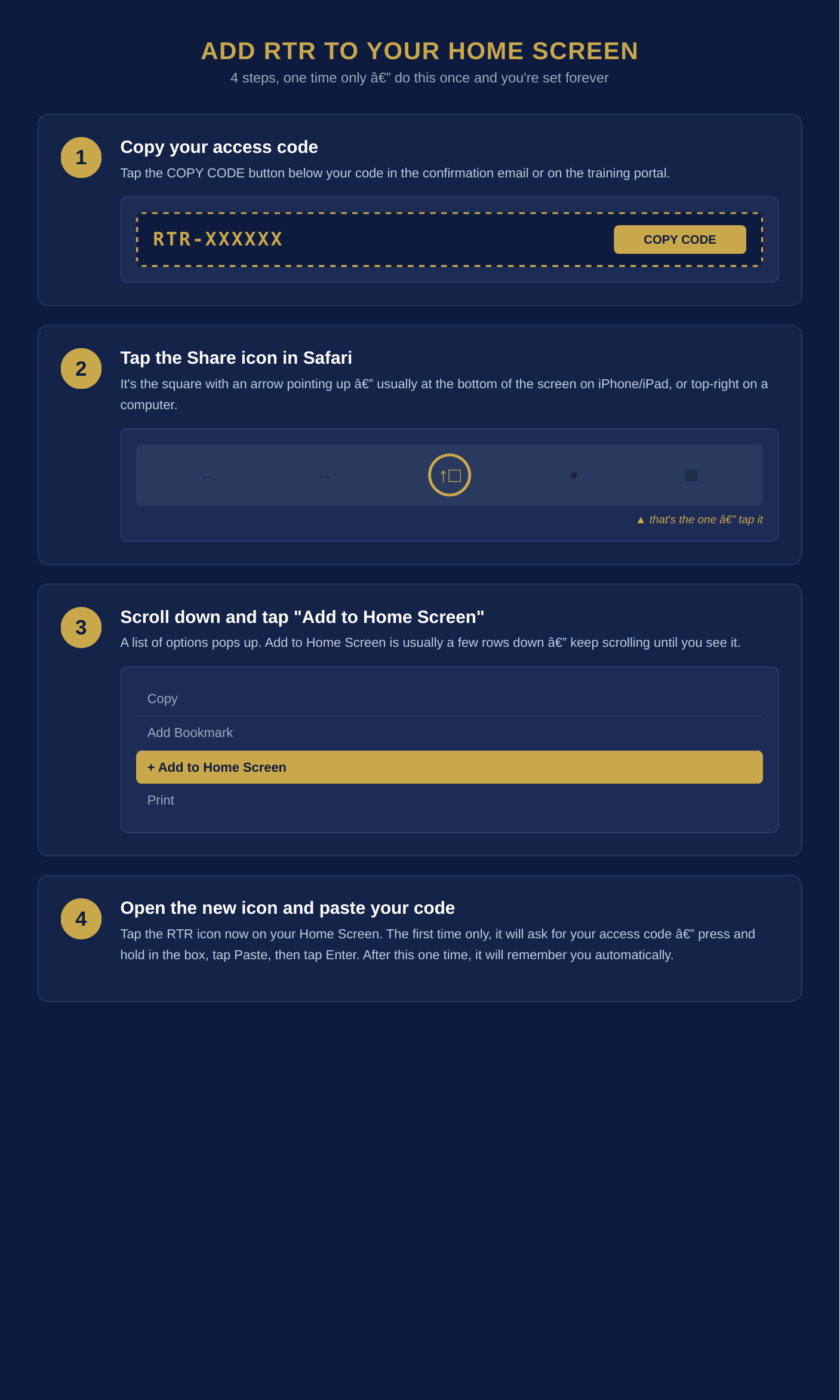
How do I add RTR to my home screen so I don't have to log in each time?
iPhone or iPad (Safari): Tap the Share icon (the square with an arrow) at the bottom of the screen, then tap "Add to Home Screen."
Android (Chrome): If a gold "INSTALL" banner appears at the bottom of the screen, tap it. If you don't see it, tap the three-dot menu in the top corner of Chrome, then tap "Install app" or "Add to Home screen."
Computer: Press Ctrl+D (Windows) or Cmd+D (Mac) to bookmark the training page.
The first time you open the new icon, it will ask for your access code once — copy it from your confirmation email, paste it in, and tap Enter. After that first time, it remembers you automatically.
Android (Chrome): If a gold "INSTALL" banner appears at the bottom of the screen, tap it. If you don't see it, tap the three-dot menu in the top corner of Chrome, then tap "Install app" or "Add to Home screen."
Computer: Press Ctrl+D (Windows) or Cmd+D (Mac) to bookmark the training page.
The first time you open the new icon, it will ask for your access code once — copy it from your confirmation email, paste it in, and tap Enter. After that first time, it remembers you automatically.
Troubleshooting
An exercise seems frozen or stuck — what do I do?
Tap the red close/exit button at the top of the exercise screen, then tap your RTR icon again to relaunch. This resets the exercise and takes you back into the portal correctly.
If you don't see a red button, or the screen doesn't respond at all, fully close the app (swipe it away from your recent apps) and reopen the RTR icon from your home screen.
If you don't see a red button, or the screen doesn't respond at all, fully close the app (swipe it away from your recent apps) and reopen the RTR icon from your home screen.
The Program
What is Rapid Threat Recognition?
RTR is a science-based cognitive training program that strengthens the Observe and Orient phases of the OODA Loop — the skills that come before a critical decision. It's built for law enforcement officers, security professionals, and licensed concealed carry holders.
How long does the program take to complete?
Most students complete the full program, including all exercises and the Student Manual, in a few weeks of consistent practice. The program is self-paced, so you can move as quickly or slowly as you'd like.
Do I receive a certificate when I finish?
Yes. Upon completing the program, you'll receive a Certificate of Completion.
Is this program affiliated with a specific agency or department?
No. RTR is an independent training program created by Observation on Demand, LLC, and is available to individual officers, agencies, and licensed concealed carry holders.
Do we need an instructor to run this program for our department?
No. RTR is not a classroom course — it's built to be self-directed from the start. Each student trains individually on their own phone, tablet, or computer, and the program itself guides them through every exercise. There's no instructor to certify, no class to schedule, and no seat time to track. That's intentional: observation is a perishable skill, like marksmanship, and it fades without regular practice. RTR is designed for short 10–30 minute sessions repeated often, so officers can keep their skills sharp on their own schedule rather than waiting for the next scheduled class.
Billing & Enrollment
What payment methods do you accept?
All payments are processed securely through Stripe. We accept all major credit and debit cards.
Do you offer agency or group pricing?
Yes. We offer tiered pricing for agencies and group enrollments. Contact us for current agency rates.
Can I get a refund?
If you have an issue with your enrollment or access, please contact us directly and we'll work with you to resolve it.
In Omni Paratus — Semper Observari
Ready for Anything. Always Observant.
Ready for Anything. Always Observant.